Intro
Q3 has been a busy quarter for us, with a lot happening across both the product and the platform. A few of the releases we’re highlighting here came directly from conversations with our customers over the summer, which, in my opinion, is the best way to fill a roadmap. These are just a few of the things we’ve shipped to make the product better, remove more of the tedious work, and make our users a little bit more superhuman.
Erik Tallbacka, Head of Engineering, Docupath
Feature: Tell your rules how to match, in your own words
Released 7 August 2026
Transformation and Rejection Rules can look up values in your Supporting Files, but until now you have had limited control over how those values were matched. You can now describe the matching behavior you want directly in your custom instructions, for example “when matching article codes against the supporting file, match the full word only”. Matching can be made stricter or more forgiving and tailored to a specific field, rule or condition. If you write nothing, nothing changes.
What it means for you Wrong matches stop turning up in review, and when a supplier’s codes start matching badly you fix it with a sentence instead of a ticket. |
Feature: Meet Atlas, AI-assisted mapping between document formats
Released 12 August 2026
Atlas is the new mapping capability in Docupath for converting one business document format into another. It reads the schemas of both formats and proposes the field mappings for you to approve, edit or reject in a visual editor. Once you approve the mappings and the validation rules, Atlas compiles them into XSLT and runs that, so no AI model sits in the data path at transform time and every run gives the same result. Documents can be transformed one at a time or in batches, and the same Atlas formats plug into the Docupath processing pipeline for inbound transformation of structured files and outbound transformation of exported data.
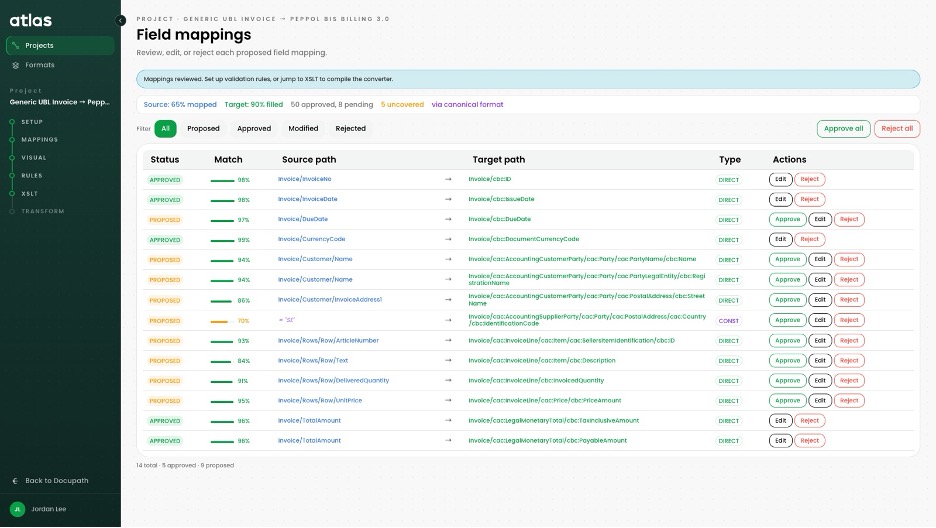
Figure 1. Proposed field mappings, each with a match score, ready to approve, edit or reject.
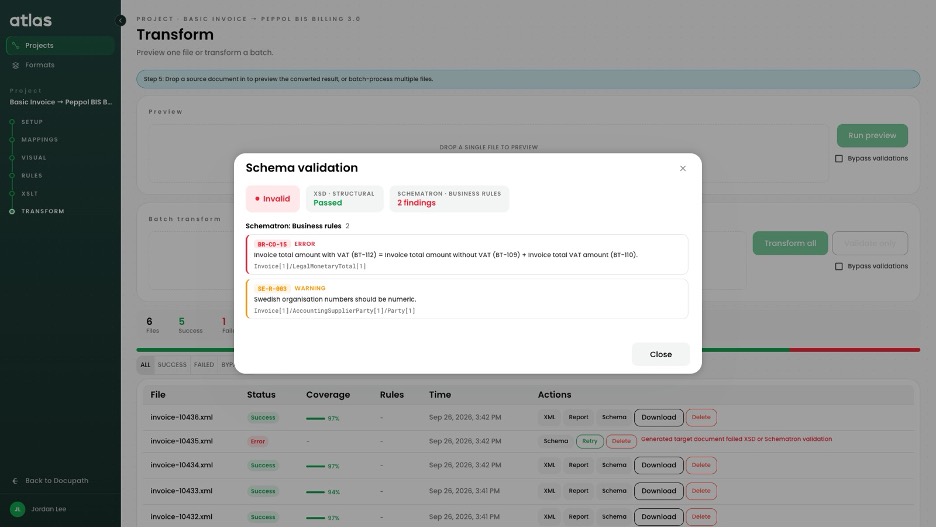
Figure 2. Every transformed document is checked against the target schema and its business rules.
What it means for you Connecting a new trading partner or meeting an e-invoicing mandate stops being a development project. The people who know the data own the mapping, and when a format changes, the mapping changes the same day. |
Feature: Custom roles and permissions
Released 24 August 2026
Role-Based Access Control (RBAC) has been rebuilt. Administrators can create custom roles with separate read and write permissions per module, or duplicate an existing role and adjust it. The built-in roles are unchanged.
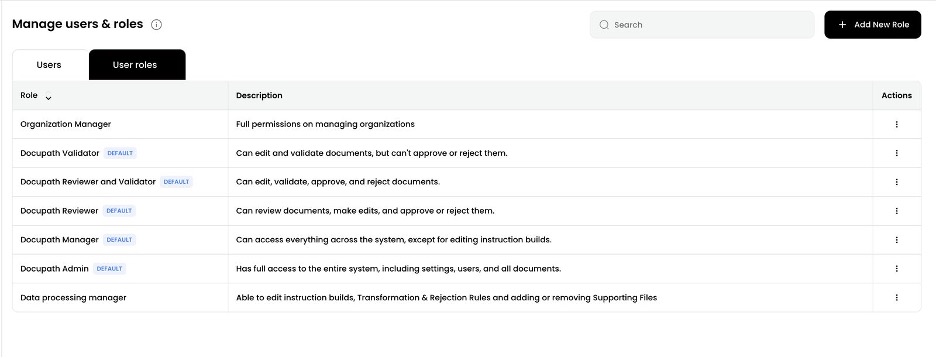
Figure 3. Custom roles sit alongside the built-in ones under Manage users and roles.
What it means for you A reviewer can have the Document Queue without the settings pages, and a partner administrator can manage users without touching export templates. |
Feature: A new Review Screen
Released 9 September 2026
The Review Screen has been rebuilt to show reviewers what happened to each field. Every value now shows where it came from (printed on the document, derived by AI, normalized or enriched), a confidence score, and the instructions or transformations that touched it. The Enrichment view lists every rule and instruction on the document, applied or not, and the change log can be filtered down to human edits.
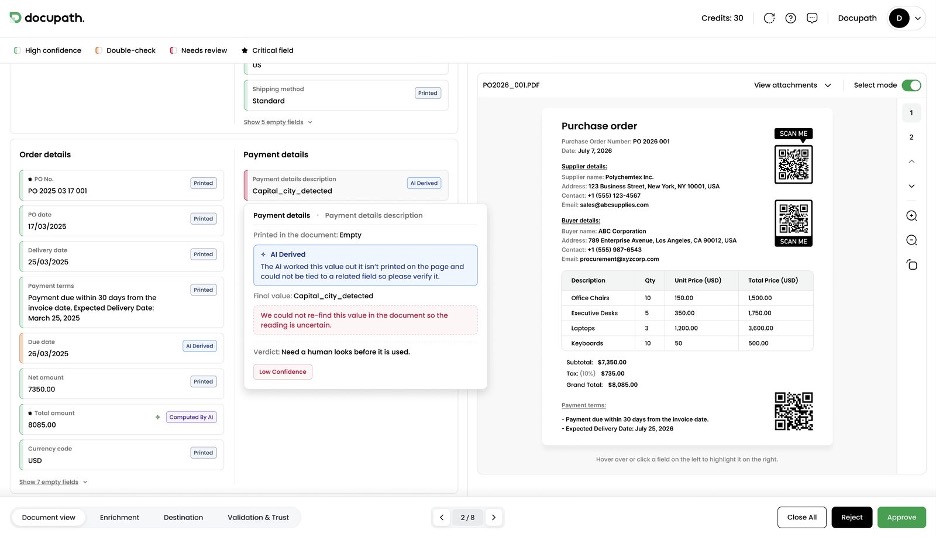
Figure 4. Field-level detail: where a value came from, how confident the AI was, and the verdict.
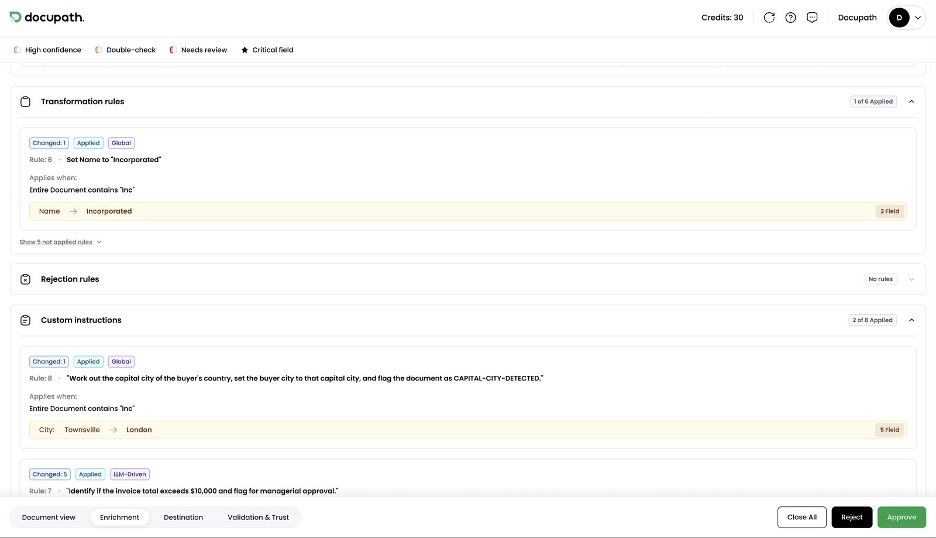
Figure 5. The Enrichment view lists every rule and instruction on the document, applied or not.
What it means for you When a field needs a second look, the reason is on screen. That is faster for the reviewer and easier to defend when someone asks why a value was approved. |
Feature: Critical fields and approval validations
Released 17 September 2026
Any field can now be marked as critical in Customize Captured Fields, and a document cannot be approved or validated while a critical field is empty. You can also add validation rules at the Approval stage that check field values, references and Supporting Files, and they run for human reviewers and automated reviews alike. Rejecting or saving a document is never blocked.
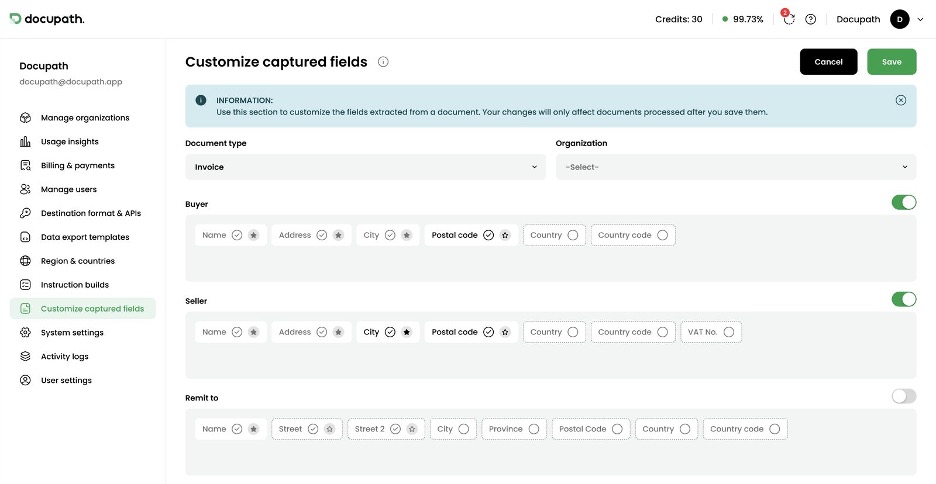
Figure 6. Critical fields are marked with a star in Customize Captured Fields.
What it means for you A rushed approval on a busy afternoon can no longer send incomplete documents to your ERP, and the standard is the same whether a person or Straight-Through Processing did the approving. |
Closing
The full list of everything we release is available at changelog.docupath.app